For basic sales reports in Malta you can follow these steps:
1. In the menu, go to: Reports - Backoffice Reports - Sales - Multifilter report.
2. Pick the filters you need, such as "Date From", "Date To"; If you want to see the specific shop this will be chosen in the "Location", If you want to have a column with information about which store sold the product you can fill in the "Group By - Outlet", and to see sales by products SKU - fill in the Second grouping "Product Code". If you want to see delivery charges for online or engraving or other services - uncheck the checkbox "Exclude Service items". If you want to also see sales from gift Vouchers - check the checkbox "Include Gift Vouchers".
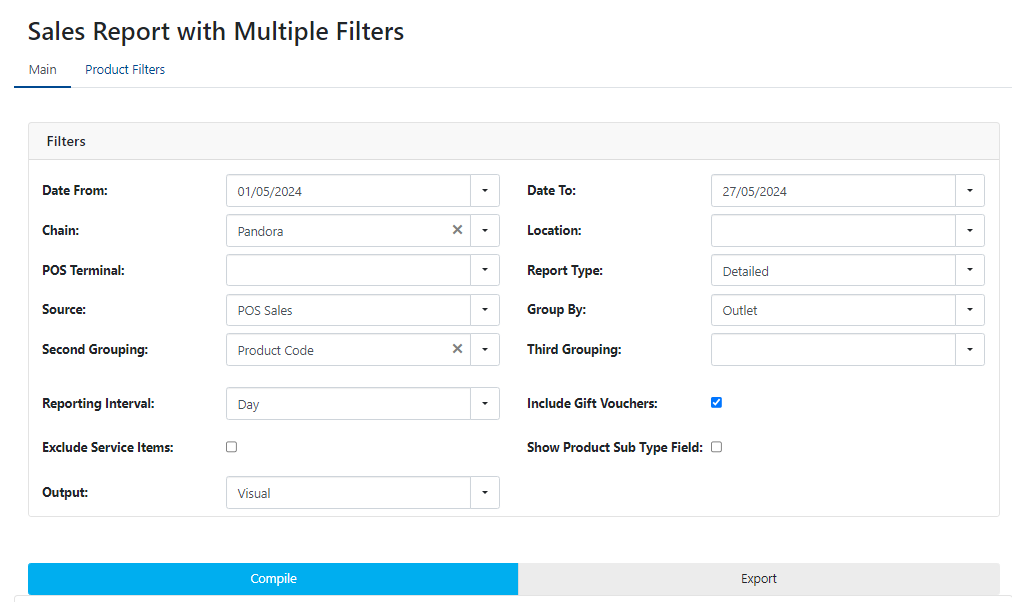
3. Once you have picked all the filters, go to "Compile". You can then see in the table bellow this button your report
4. If you want it in Excel, go to "Export" - your report will be saved in .xlxs format and you can use it as you wish.
Was this article helpful?
That’s Great!
Thank you for your feedback
Sorry! We couldn't be helpful
Thank you for your feedback
Feedback sent
We appreciate your effort and will try to fix the article