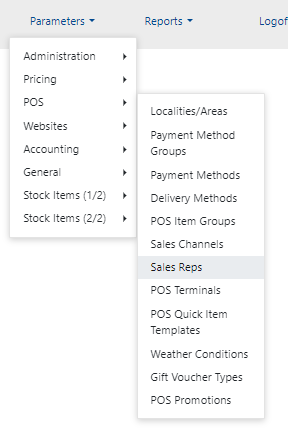
1. Go to Parameters - POS - Sales Reps
2. Go to the last page and see the last number of Sales Rep Name (in this example it is 0036 Federica)
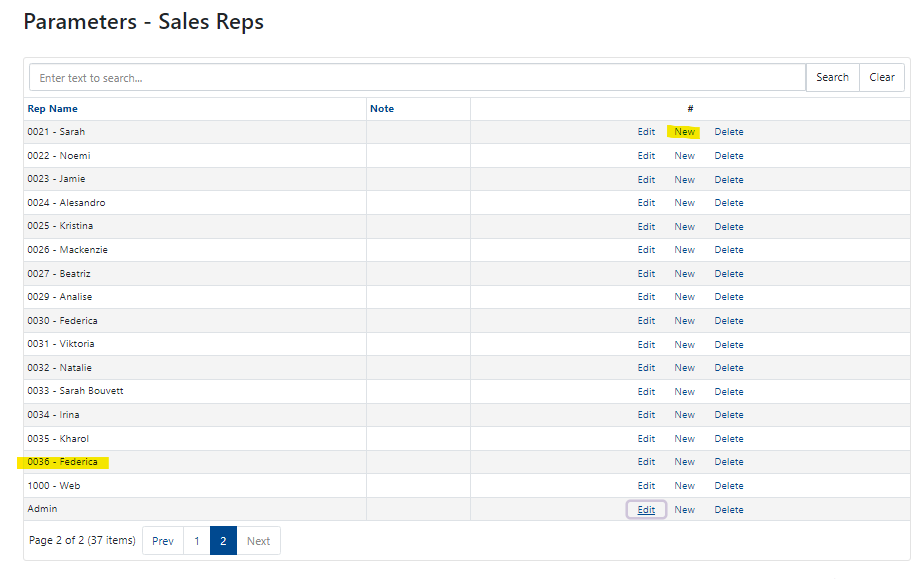
3. Click on "New" anywhere in the Reps
4. You can fill in the new Sales Rep but also write in the next number, so if Federica was 0036, writhe in the "Rep Name" - "0037 - NAME" and then click "Update"

5. You now have a new Sales Rep you can refer to when adding a new POS user.
Instructions for a new POS user are here.
Was this article helpful?
That’s Great!
Thank you for your feedback
Sorry! We couldn't be helpful
Thank you for your feedback
Feedback sent
We appreciate your effort and will try to fix the article